
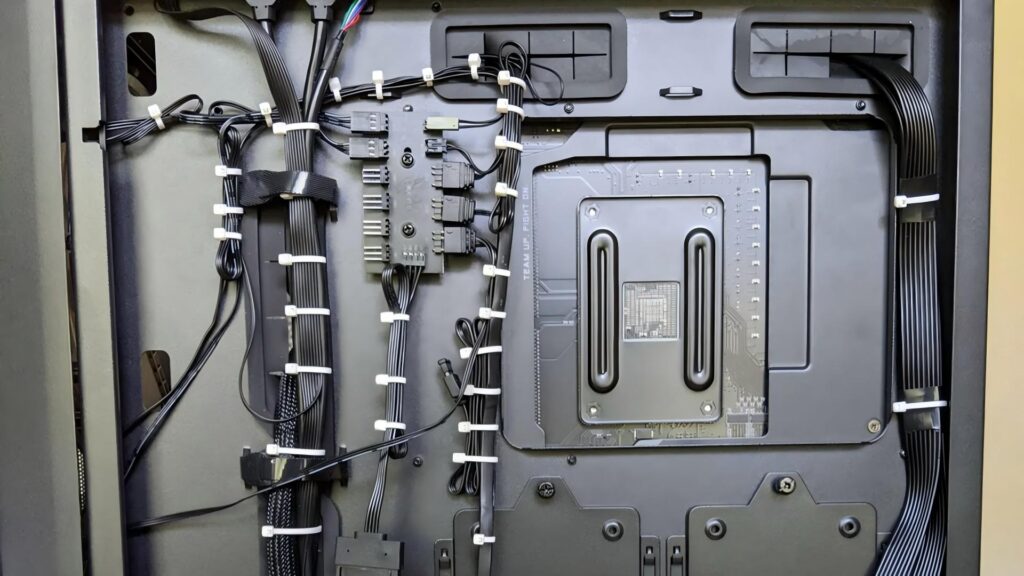
Messy computer cables are not only unpleasant to look at but can also cause airflow issues, make maintenance difficult, and increase the risk of accidental disconnections. Zip ties (also called cable ties) offer a simple and affordable solution for organizing computer cables at home or in the office.
This guide explains how to zip tie computer cables properly, covering cable preparation, correct tying methods, and important safety tips to avoid damage to sensitive electronics.
Why Zip Tying Computer Cables Matters
Proper cable management provides several benefits:
- Improves airflow around PCs and laptops
- Reduces dust accumulation
- Makes troubleshooting and upgrades easier
- Prevents cables from bending or pulling loose
- Creates a cleaner and more professional workspace
Whether you are managing a desktop PC, gaming setup, office workstation, or server cabinet, zip ties can help keep cables under control.
Choosing the Right Zip Ties for Computer Cables
Not all zip ties are suitable for computer cable management. The following factors are important:
Material
Nylon zip ties are the most common choice due to their flexibility and durability.
Size
Small zip ties (2.5 mm to 3.6 mm width) are ideal for USB, HDMI, Ethernet, and power cables. Avoid oversized ties that apply unnecessary pressure.
Releasable vs. standard
Releasable zip ties are recommended for computer cables because they allow easy adjustments during upgrades or maintenance.
Color
Black or neutral-colored zip ties blend well with office and gaming setups, while colored ties can be used for cable identification.
Preparing Computer Cables Before Zip Tying
Before securing cables, take time to prepare them properly:
- Power off and unplug devices
Always disconnect power to avoid electrical risks. - Sort cables by function
Group power cables, data cables, and peripheral cables separately. - Check cable lengths
Avoid coiling excess cable too tightly, as this may affect signal quality or heat dissipation. - Clean the workspace
Removing dust and debris helps ensure long-term cable stability.
Step-by-Step: How to Zip Tie Computer Cables
Align the cables neatly
Lay cables parallel and avoid crossing them unnecessarily.
Place the zip tie loosely
Wrap the zip tie around the cable bundle without tightening immediately.
Adjust spacing
Leave small gaps between zip ties (about 10–15 cm) to prevent stress points.
Tighten gently
Zip ties should be snug, not tight. You should be able to slightly move the cables.
Trim excess tail carefully
Cut the tail flush to avoid sharp edges that could scratch hands or equipment.
Secure cables to fixed points if needed
Desk frames, cable trays, or PC case loops are ideal anchor points.
Common Mistakes to Avoid
Over-tightening zip ties
This can damage cable insulation and internal wiring.
Bundling power and data cables tightly together
This may cause interference or heat buildup.
Zip tying near connectors
Stress near plugs and ports can lead to premature failure.
Using metal zip ties
Metal ties can damage cables and pose electrical risks in computer setups.
Reusable Alternatives for Frequent Changes
If you often upgrade or rearrange your setup, consider alternatives such as:
- Releasable zip ties
- Hook-and-loop (Velcro) cable ties
- Cable sleeves combined with zip ties for structure
These options provide flexibility while maintaining a tidy appearance.
When Zip Ties Are Not Recommended
Zip ties should not be used to:
- Repair damaged or frayed cables
- Force cables into tight bends
- Secure cables inside high-heat power supplies
In these situations, replacing the cable or using proper cable management accessories is safer.
Conclusion
Zip tying computer cables is an effective way to improve organization, airflow, and workspace efficiency when done correctly. By choosing the right zip ties, applying gentle tension, and following safe spacing practices, you can create a clean and functional computer setup without risking cable damage.
For long-term reliability, always inspect zip ties periodically and adjust them as your system evolves.